Gridfinity 6: Little Screwdrivers

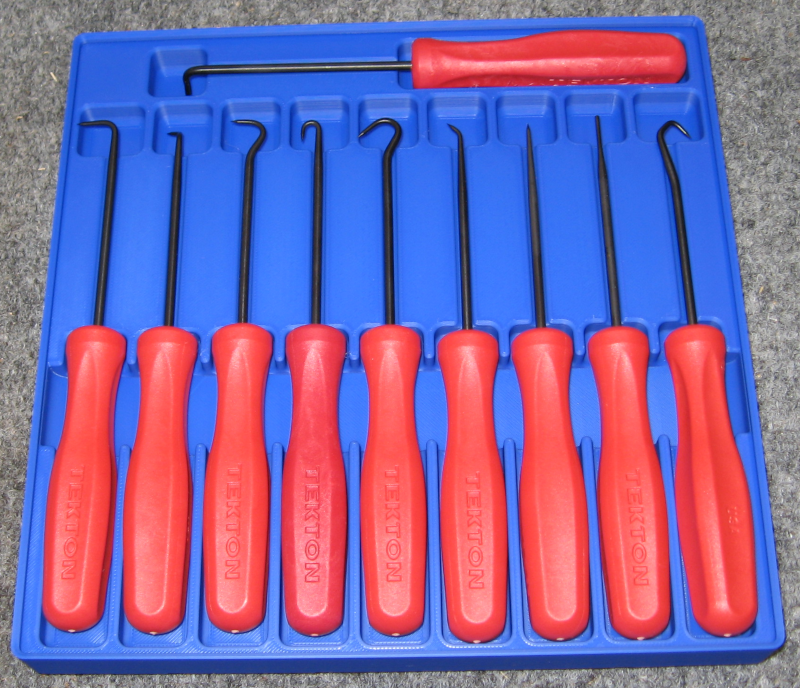
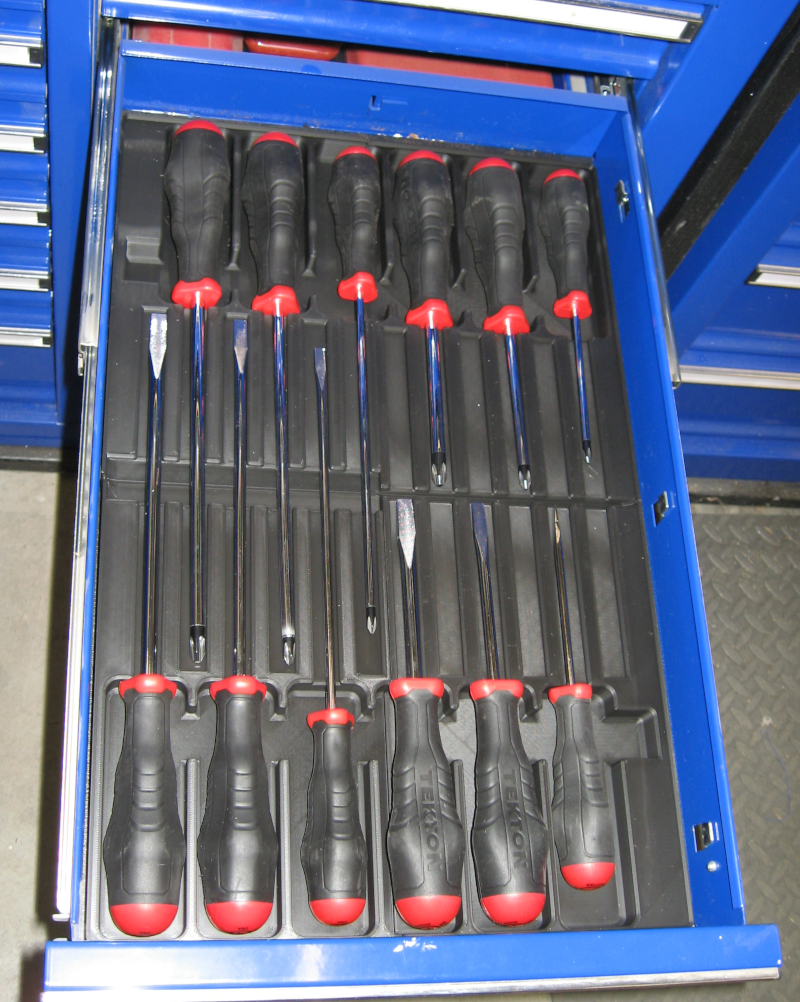
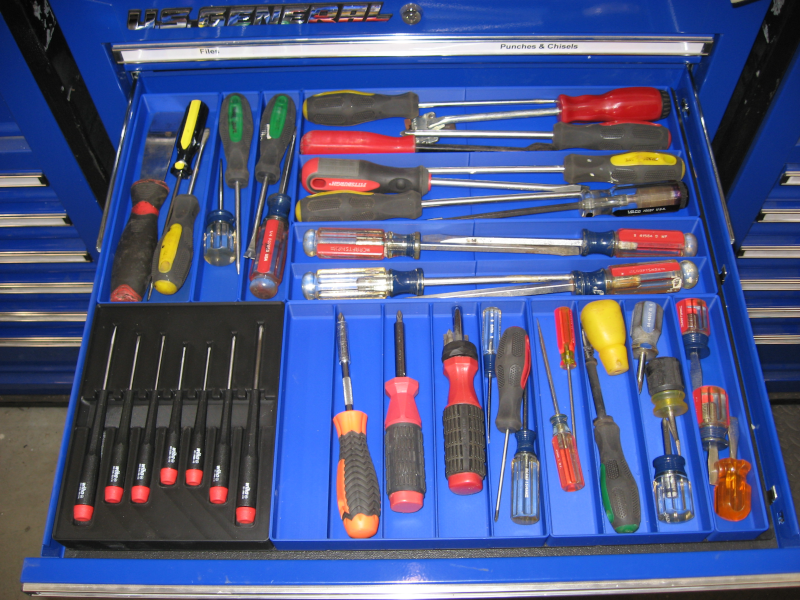
I’ve mentioned targeted tool upgrades. Some projects, notably the electrical projects, have required small screwdrivers. I have one or two that fit, and have to dig through the screwdriver drawer to find them. Time to end that foolishness!

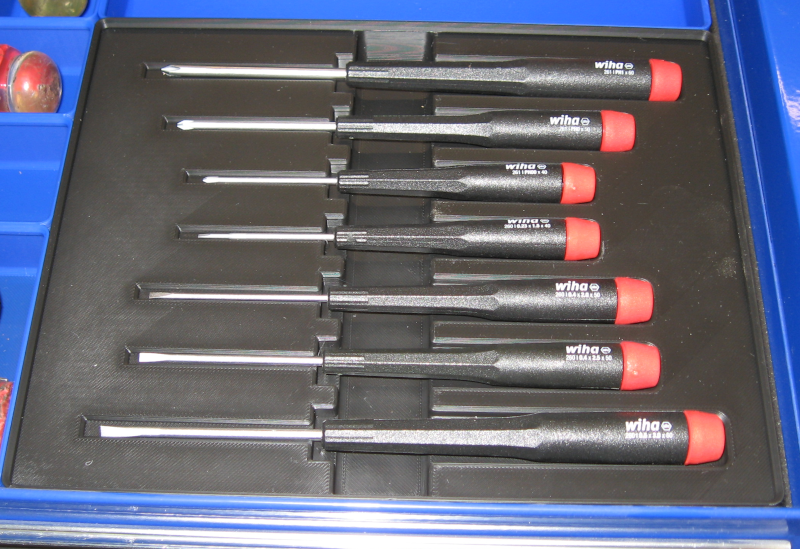
The small Wiha screwdrivers are good, so order a set. And, of course, design a bin for them.

Bin for small screwdrivers

Posted in Resources, Tips and Tricks, Workshop | Leave a comment

GridFinity 5: Socket Drawer

After designing custom bins for ratchets and extensions there was space left over. No problem – I have more tools to go there!

First was a distributor wrench. This is a two piece tool with a roughly “L” shape which was a bit tricky to fit. Using the standard GridFinity bin sizes required a larger bin than I really wanted, but no choice in the matter – you have to work in integer multiples of the grid size. OK, push the distributor wrenches to the outside edges of the bin and use the center for something. What about the oxygen sensor socket that didn’t really go anywhere? Nice – fits almost like it was supposed to go there. A few iterations and this bin was done.

Some of the tools didn’t justify the work of creating custom bins. For these simply create a hollow bin in the GridFinity generator and print them out. With GridFinity you always have options!

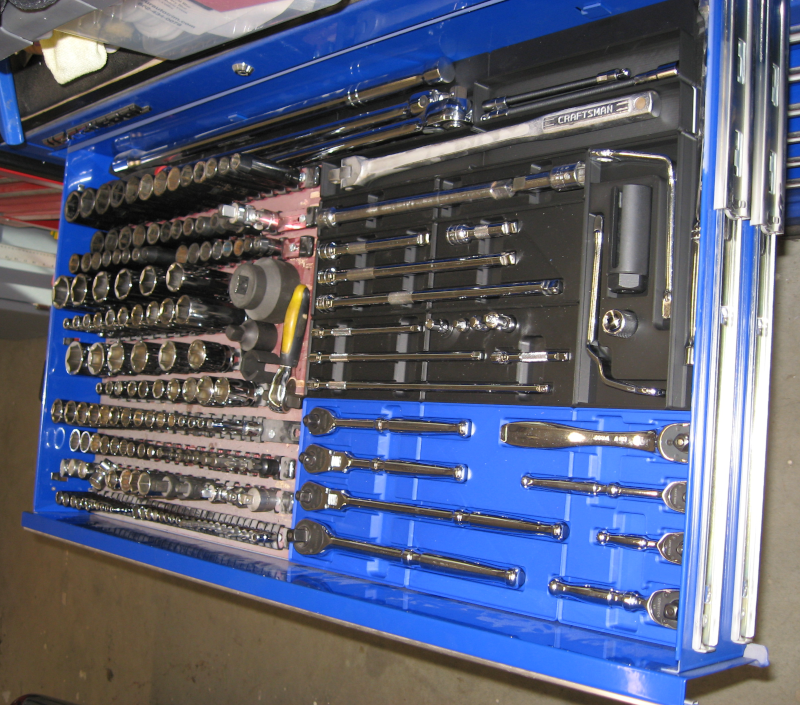
Now for the socket drawer itself. I already had all of the sockets mounted on rails. While many people use GridFinity bins for sockets I like the rails – so, keep the rails and use Gridfinity for everything else.

The process I’ve been describing so far focused on designing the individual bins. While I haven’t mentioned it yet, I’ve been working with a set of GridFinity baseplates sized for the drawer space. In addition to holding the tools, the set of bins were designed to fit the available space. This required a fair amount of arranging and re-arranging the bins, plus some of the bins were designed to fit the available space around other bins.

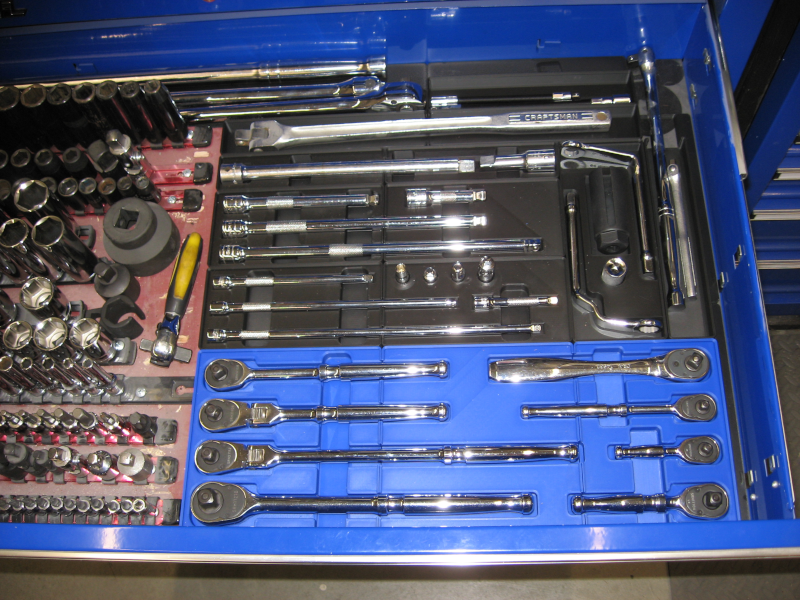
GridFinity organizers for ratchets and extensions
Full socket drawer – now completely organized!

Posted in Resources, Tips and Tricks, Workshop | Leave a comment

Gridfinity 4: Extensions

To effectively use sockets you often need extensions. I have a combination of random extensions from the past 50 years which are piled together plus a good set of 3/8″ extensions in a molded factory tray. I prefer using these good extensions, both because they are good and because I can immediately grab the one I need out of the tray.

Based on the previously described strategy of selective upgrades I ordered a set of 1/4″ socket extensions from Tekton.

With extensions in hand (actually, they were piled on the desk next to my CAD workstation) I went through the drill of laying them out, determining what size Gridfinity bin was needed to hold them, and starting the design process.

Creating the outlines was simple: First create a solid bin using the Gridfinity Bin Generator. The extensions are too long to print as a single piece, so create two bins. Create a sketch on the face of the bin. Make two rectangles in Fusion, one for the head of the extension and one for the shaft. The head size was the same for all of the extensions.

The shafts of the extensions were all the same diameter but different lengths. I learned a new way to make these: Create a line the length of the extension from the mid point of one edge of the head – Fusion will select the midpoint of the line when you mouse over it and will lock the line to 90 degrees from the old one when you have the mouse close to 90 degrees. Click on the midpoint, drag the new line at roughly 90 degrees, release the mouse button, and type in the length of the shaft. Bingo! Done!

Select this line, select the offset command with offset both sides, and make the offset the radius of the shaft. Delete the original line or change it to a construction line and then add lines between each end of the offsets. Viola, you have an outline for the shaft. This is much faster and easier than the manual geometric construction techniques I had been using. I tend to go back to my old drafting board geometric construction techniques. Fusion fully supports this old approach, but it also has many additional powerful ways to build things. I have a lot to learn! And I’m making some progress. Slow, but the more you do it the better you get. Amazing how that works!

To add another extension you make a copy of the first extension. Add a dimension to the shaft length and then edit the dimension to change it to the new length. Fusion extends (or shortens) the shaft. The parametric constraints in Fusion make sure that both sides of the shaft are the same length, the ends of the shaft remain connected to the sides, and that the shaft remains connected to the head. Magic! Repeat this process until you have created outlines for alll of the extensions and then finish (close) the sketch.

I generally make the cutouts half the depth of the tool. Select all of the extension heads, extrude them one half of the diameter of the head, and subtract them from the bin. Then select all of the shafts, extrude them one half of the shaft diameter, and subtract them from the bin.

With cutouts for all of the extensions done create the finger reliefs. Create another sketch on the face of the bin. Determine where you want the finger reliefs and add rectangles across the bin. Close the sketch. Select all of the finger reliefs, extrude them, and subtract from the bin.

As a final step go through and fillet all of the sharp edges. Not absolutely necessary, but calms my finer engineering sensibilities.

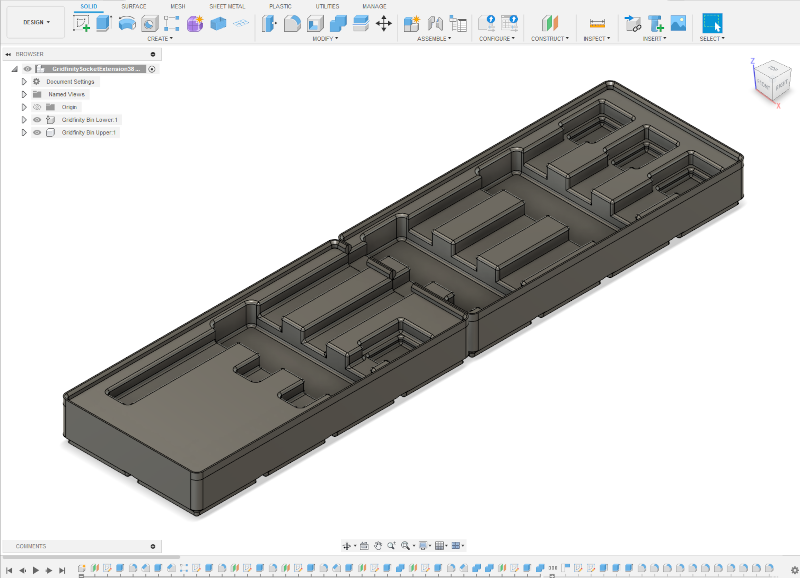
CAD model of extension bin

While the extension bins are too long to print as a single part the two bins in the design can be placed side by side on the printer and printed in a single print run.

That turned out pretty good. Now repeat the design process for the 1/4″ and 1/2″ extensions.

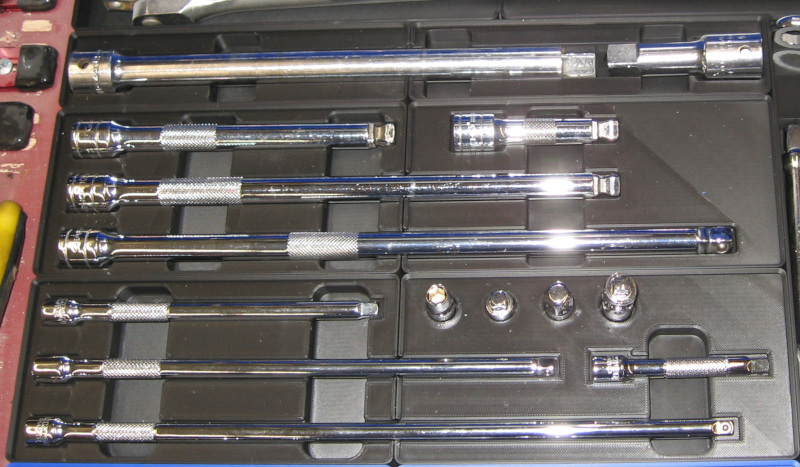
Finished socket bins – 1/2″, 3/8″ and 1/4″

Posted in Tips and Tricks, Uncategorized, Workshop | Leave a comment

Gridfinity 3: More Ratchets

In the last post we made a Gridfinity bin for a single ratchet. The most flexible approach is to make a separate bin for each ratchet. This takes full advantage of Gridfinity flexibility – you can add more ratchets just by making new bins and re-arranging the bins on the Gridfinity baseplate.

The downside of making a bin per ratchet is packing efficiency – in many cases you can fit more tools into a given space by putting multiple tools in a single larger bin. Basically you arrange the tools in a way that minimizes space and then put a bin around them. In many cases this can reduce the required space by more than 25% by using this approach.

The choice is long term modularity and flexibility vs. fitting more tools into given drawer space in a tool chest. Of course it isn’t an either/or decision – in some cases one approach makes sense, in other cases the other is the best choice. And in some cases it makes sense to just pile the tools in a drawer!

I decided on a divide and conquer approach: spend time packaging my most used tools into efficient Gridfinity bins, lesser used tools into generic Gridfinity bins, and pile miscellaneous tools into a drawer.

As part of this approach I also decided to do selective upgrades of certain tools. For example, I have a random pile of screwdrivers that have accumulated over the last 50 years. These range from good screwdrivers – mostly 1970’s Craftsman – to junk that should really be thrown away. I’ll cover the screwdriver strategy in a future article.

I have, ummm, “several” ratchets. And breaker bars. And accessories like extensions and adapters. Some of them are junk. Over the last five years or so I’ve built up a collection of good Tekton ratchets that are my go-to for anything involving a socket. I have nine of these – eight regular ratchets plus a ratchet with a 24 inch handle for heavy jobs. Plus a three foot 3/4″ breaker bar for really heavy jobs, like the ball joints on a 1963 Imperial. I won’t try to put the six foot pipe, AKA cheater bar, that enhances the three foot breaker bar into the tool chest.

Studying the situation I decided to put the two foot ratchet and three foot long cheater bar across the back of the drawer and not bother putting them into a bin.

The remaining 8 ratchets were a mixture of 1/4″, 3/8″, and 1/2″ drive and included regular handle, long handle, stubby handle, and flex handle. All of these are useful and needed for dealing with various fastener situations.

Grab these ratchets and start trying different arrangements. The goal is to fit them into a minimal space while being able to easily pick up any ratchet.

After playing with various arrangements it looks like I can fit them into an 11 x 4 grid unit bin. My 3D printer is capable of printing a 5 x 5 bin, so I used the Fusion Gridfinity Generator to generate two 4 x 4 and one 4 x 3 solid bins.

I positioned these bins together in Fusion and then started creating the outlinesfor each ratchet. Once I had the outlines I arranged them in the bin with equal spacing between each ratchet. These outlines were extruded and subtracted from the solid bins to create the cutouts. After making the solid cutouts for each ratchet I studied the result for a while and then created a set of finger reliefs to make it easy to pick up the ratchets.

As a last step I filleted (rounded) all the edges. On heavily loaded parts this is critical for strength and to avoid cracks. Sharp inside corners are the most common place for cracks to start. It isn’t really critical for these bins, but it is easy to in Fusion, looks better, and keeps my mechanical engineering spider sense from tingling so strongly.

With the three bins designed, send them to the printer one by one. Total time for this was over 12 hours, but 3D printing is “fire and forget”.

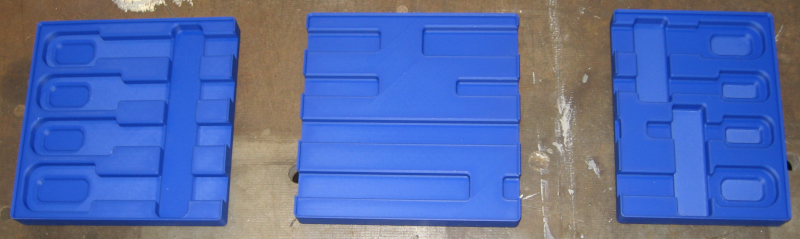
Gridfinity Ratchet Bins

The three bins drop into the Gridfinity baseplate locking them into position. Add ratchets and done.

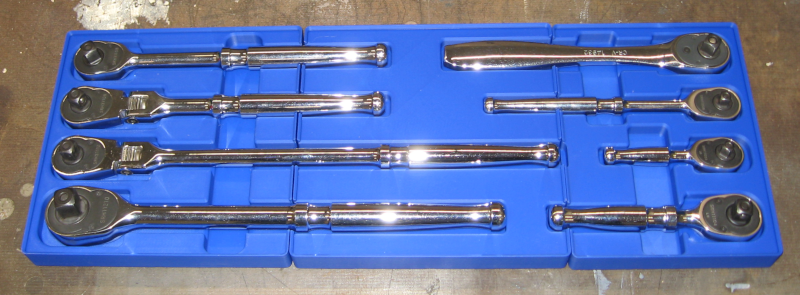
Ratchet bin with ratchets

The ratchets fit. Once the bins are dropped into the baseplate they don’t move. This fixes the previous problem with the ratchets moving around when the drawer is opened and closed. You can easily grab whichever ratchet you need. And you can tell at a glance if you have returned all ratchets to their proper location.

Despite pounding my head against Fusion (I still have a lot to learn!) this was actually a fun little project. The results were exactly what I was shooting for: creating the CAD model and learning more, 3D printing, and fitting the end result into the tool chest.

On to the next project!

Posted in Resources, Tips and Tricks, Workshop | Leave a comment

Gridfinity 2: Ratchet Test

By this point you should be familiar with my approach to something new: start with a simple test piece, iterate until I’m happy, and then move through progressively more complex designs until I get what I want.

So, instead of jumping directly into designing a tray for all nine ratchets, grab one ratchet and design a tray for it. One of the goals of prototyping is to minimize the amount of filament you waste, so start with the 3/8″ stubby ratchet instead of the 1/2″ long handle one.

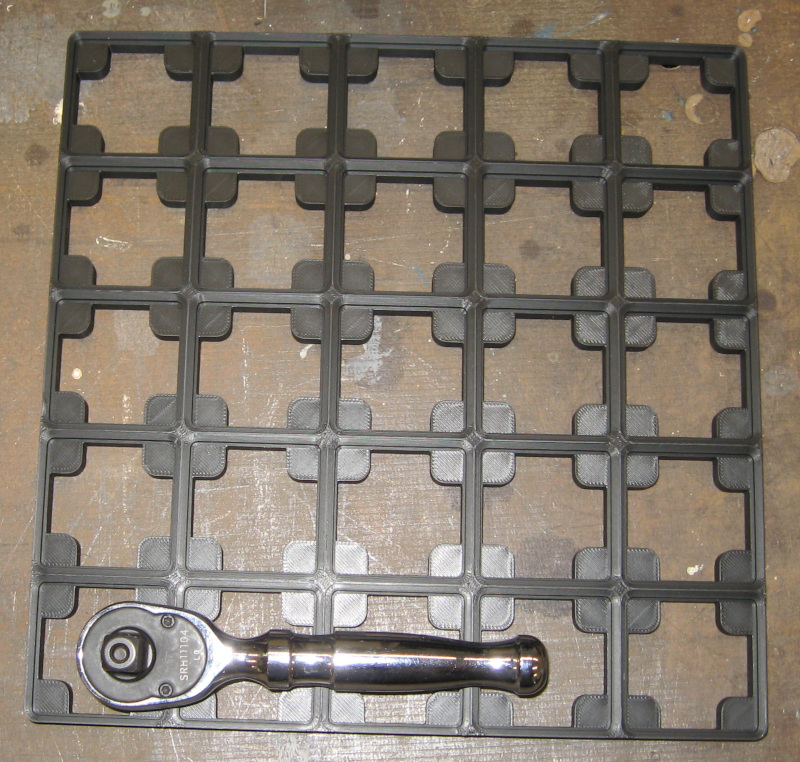
First, how large a bin is needed to hold the ratchet? You can measure and check. Or just lay the ratchet down on a baseplate and eyeball it. In any case, the test ratchet is one bin unit wide and four bin units long.

Gridfinity base with stubby ratchet

In Fusion select the Gridfinity Bin generator. Tell it to create a 1×4 solid bin. We start with a solid bin and make a cutout to fit the ratchet. Hit Enter and the bin appears as a new component, ready to edit.

Next, create a Fusion Sketch on the top surface of the bin. Measure the ratchet and create an outline of the ratchet. The easiest way is to create two rectangles, one for the head of the ratchet and one for the handle. Center this outline in the bin.

Make this outline just a little bigger than the ratchet. How much bigger? Big enough to make it easy to remove and replace the ratchet, small enough for a good looking fit. A sixteenth of an inch is probably a good starting point.

Fillet the corners of the outline to make it look better and fit better. While not required this is easy to do in Fusion and makes the end result look more professional.

After finishing the outline extrude it to make a solid body and then extract this body from the bin to create the cutout for the ratchet. The depth of the cutout depends on the tool you are designing the bin to hold. For these ratchets 3/8″ is a good starting point.

Done!

Not quiet. The cutout is a tight fit on the ratchet and roughly half the depth of the ratchet. You can’t grab the ratchet – the only way to remove the ratchet is to pry it out with a screwdriver. Not the greatest user experience…

We need to add a finger relief to the bin so that we can easily grab the ratchet. The finger relief should be located where you naturally grab the ratchet. It should be wide long enough to stick your finger and thumb into it – 3/4″ or 1″ is a good starting point.

The finger relief needs to be wide enough to get your finger and thumb in to grab the ratchet – 1/2″ or 3/4″ is a good starting point. And it needs to be deeper than the ratchet cutout so that you can get your fingers under the ratchet and pull it out. I first tried 1/2″ deep, but this cut through the bottom of the bin. 0.450″ was the deepest I could make it.

I couldn’t make the finger relief as wide as I wanted to, so make it as wide as the bin allowed. Extrude it 0.450″ and subtract from the bin.

Looks good, so send it to the printer. Wait patiently.

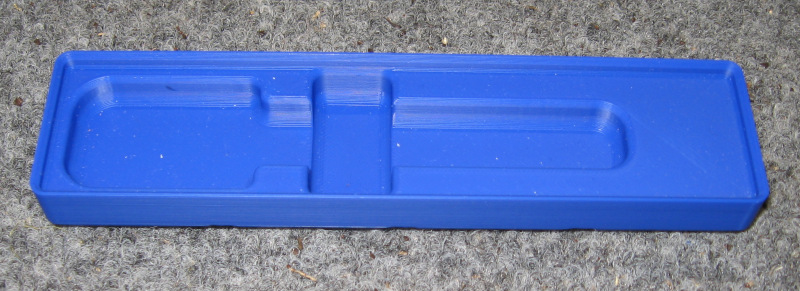
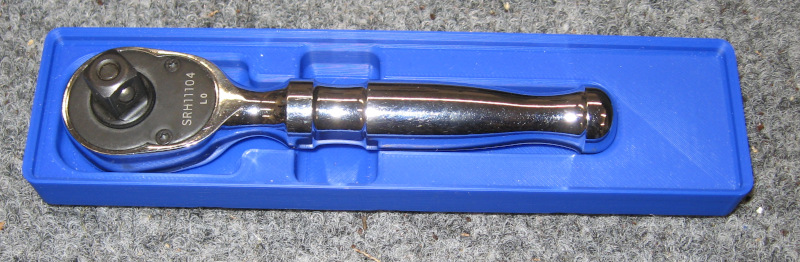
Pop the finished bin out of the printer, drop the ratchet in, and start checking how well it works. Some room for optimization of size and spacing, but overall a successful first prototype!

Prototype ratchet bin
Prototype bin with ratchet

It holds the ratchet but could be a bit longer. We can either tweak the model and make another prototype or note what changes are needed and include them in the actual design.

Posted in Resources, Tips and Tricks, Workshop | Leave a comment

Gridfinity Rabbit Hole

One of the reasons for getting a 3D printer was to print out various types of organizers for the workshop. There are literally thousands of different designs floating around. A search for organizers quickly leads you to the modular Gridfinity system created by Zack Freedman.

Gridfinity is kind of hard to explain – it is in many ways more a community than anything else. Coming from the Open Source software world it seems familiar and comfortable. There are thousands of existing designs available to hold both things you need and things you never thought of. You can also design custom bins for your own unique needs. Gridfinity is used to store both tools and supplies. It comes close to being a universal solution for organization.

At its core Gridfinity is a specification for a baseplate and set of bins that fit into the baseplate, arranged as a 42mm grid. Yes, 42 – the answer to Life, the Universe, and Everything. The baseplate can be scaled to whatever size is needed. The bins can be customized to whatever size it needed – height, width, depth, and internal partitions. Further, you can start with a solid bin and use a CAD system to create custom cutouts to hold pretty much anything. All sizing is done in integer multiples of this 42mm grid size.

Gridfinity base and bins. Source: Hackaday.com

When used in drawers the Gridfinity base locks the bins into position and keeps them from moving around when you open and close the drawers – just what I need!

Gridfinity bins holding a variety of tools

While I have no end of “opportunities for organization” in the workshop I decided to start with my socket drawer. Several reasons for this: sockets and ratchets are the single most heavily used tools I own. Sockets are currently organized, but the nine ratchets, three breaker bars, multiple sets of extensions, and various misc. pieces are just loose.

Sockets and ratchets are prime candidates for Kaizen-type organization where you can immediately find everything. Kaizen organization is even better for putting things up – put each socket and ratchet back in its fitted location. You can instantly tell if anything is missing. I’m already spoiled by the combination of knowing exactly where to grab for a tool and easily seeing if everything has been returned to the toolbox. This makes me more productive and less frustrated – few things annoy me more than searching for a tool I set down a couple of minutes ago!

The good news is Gridfinity is modular. The bad news is Gridfinity is modular. Much like Kaizen Foam, you can fit it to whatever space is available and do custom cutouts for each tool you want to store.

The first challenge is that my 3D printer has a maximum size of 10″ x 10″ x 10″. This means that the largest Gridfinity base or bin I can print out is 5×6 grid units. Anything larger than this will have to be broken down into smaller pieces for printing. As an example, the socket drawer will need nine of the 5×5 baseplates plus two 1×5 baseplates with a 3/8″ spacer down one side and three 2×5 baseplates with a 1/4″ spacer down one side.

Lev Mishin has created a Gridfinity Generator for Autodesk Fusion that is available from the Autodesk App Store. This Gridfinity Generator can generate arbitrary sizes of baseplates and bins with a variety of options. If you are using Gridfinity and Fusion this is a must have.

To be continued…

Posted in Resources, Tips and Tricks, Workshop | Leave a comment

Cool!

The Imperial has been running hot ever since the engine rebuild. It isn’t overheating, but running on the Interstate it goes to the top of the normal range – sometimes just a bit above. Running on back roads at slower speeds it runs cooler. In cold weather it runs cooler.

Potentially related, the last time I had the AC worked on, the shop told me that the fan clutch wasn’t working – the fan was just freewheeling. While this shouldn’t have any impact on the Interstate it was another data point.

OK, check parts. Hmm, there is an option of a heavy duty fan clutch that applies more torque to the fan. Looks like I should try one of those.

While I’m looking, I’ve been a bit suspicious of the water pump. Interesting – they have standard volume water pumps as well as high volume/pressure water pumps. Might as well do that while replacing the fan clutch, so add a high volume/pressure water pump to the order.

While I’ve already replaced the thermostat once, might as well see what else is available. Would you look at that – there are high flow thermostats available! Add one of those to the order.

Replacing the water pump and fan clutch isn’t that bad of a job, but it still took a couple of hours. The thermostat is a different story – it is buried under the AC compressor and tightly protected by the 5 braces supporting the compressor. One of the bolts can be reached with a swivel socket, but the only access to the other bolt is with a wrench that can only make 1/8th of a turn at a time. Both removing and installing the bolt…

By exercising the full capabilities of my patience the high flow thermostat was finally installed with no collateral damage. Top off the coolant and time for a test drive!

Initial results weren’t encouraging. Once I got on the highway temperature headed up toward the hot line. Crud! Another dead end!

But after 10 or 15 minutes of driving the temperature started dropping, ending up on the normal temperature line. And it stayed there! Odd, what is going on here?

After a few minutes of thought, it looks like this behavior could happen as air was purged out of the system. The cooling system had to be drained to replace the water pump and thermostat, so introducing air into the system was a concern. Air locks in the cooling system are a common cause of overheating.

Did I manage to get lucky? While encouraging, this was a 60 degree day, so still not definitive. Need to try it on a hot day to be sure.

Today was in the mid-80’s so fire up the Imperial and head out. It quickly warmed up to normal operating temperature – so far, so good.

Head to the Interstate and start cruising with traffic at 70-75 mph. The temp gauge moved about a needle width above the normal line. And stayed there! I put in close to 50 miles of high speed driving with the temp gauge holding steady. Even better, the air conditioner was running the whole time, putting additional stress on the cooling system.

Getting off the Interstate the temp dropped slightly to right on top of the normal mark. Perfect! This is exactly what you would expect if the cooling system is working correctly. I need to test it on a 95 degree day, but it should still be OK.

And, needless to say, there was much rejoicing!

Posted in Restoration | Leave a comment

Trunk Trials: the Bag Job

Like most car collectors I have a cover for the car. Even in a garage dust collects on cars, so you throw a car cover over them for protection. The cover I’m using for the Imperial was originally for a full size extended cab pickup. Meaning bulky and heavy. And difficult to store when it isn’t on the car.

I usually just throw it in the trunk. Where it looks bad.

As I was standing behind the Imperial admiring the finished trunk and nodding in satisfaction I noticed the rolled up car cover. Right next to the remnants of carpet from the trunk.

Whoa – what happens if I make a bag out of trunk carpet, stuff the car cover in it, and then shove the bag onto the trunk ledge behind the back seat? This would look fine and would conceal all of the unfinished areas around the back seat that were bothering me.

Since it is the same carpet as the floor of the trunk, it would look like a finished continuation of the trunk floor.

Right! Grab the one remaining large piece of carpet and measure it. It was long enough to hold the cover and fill the gap in the trunk. But it wasn’t wide enough to wrap around the rolled up car cover. Krud! So close, so close…

Just a minute – there are still some smaller carpet scraps… Start laying pieces of carpet on the work table. Just enough to get to the needed size. Well, if I’m willing to sew smaller pieces together I can make this work!

So I started sewing smaller pieces. And it worked! The car cover fits inside, it fits in the trunk, and it nicely finishes the trunk.

Car cover in carpet bag, stuffed under package shelf.

And there was much rejoicing!

I remain very happy with the Juki sewing machine – it takes whatever thick material I’m trying to stick together and just calmly munches through it with even stitches and no sign of strain. In this case I was sewing up to four layers of carpet together – the Juki just said “whatever” and took it in stride.

Posted in Restoration | Leave a comment

Trunk Trials Continued

A few of years ago I picked up a couple of yards of cheap indoor/outdoor carpet and (somewhat roughly) cut and fitted it to the trunk. The plan was to replace it with something better when I actually finished the trunk.

But after (semi)careful consideration, it didn’t look too bad. It was already (somewhat roughly) cut and fitted. The new side panels hide the edges of the carpet. And there were things I still needed to learn about working with carpet.

OK, change of plan – finish off the existing carpet and then decide what to do.

Something needed to be done about the rough edges of the carpet. These edges are typically bound with bias tape – a fabric tape that wraps around the edge of the carpet and is sewn in place.

Carpet binding. Including sewing error at top…

There are sewing machines specifically designed to bind the edges of carpet. Just feed the carpet through the machine and you have a perfectly bound edge. Of course these machines cost several thousand dollars.

They make gadgets that fit regular sewing machines – including Juki – and fold the bias tape over the top and bottom of the carpet and hold it in place while sewing. There are commercial versions for several hundred dollars. There are also a bunch of different models in the $10-$20 price range. Several hundred dollars is too much. But I’m willing to risk $10 and some of my time on one of the cheap ones.

Tape folder – carpet binding tool for sewing machine

You may find this hard to believe, but the cheap tape folders suck. And I suck at using them. It is difficult to load the fabric tape into them, difficult to keep the tape properly feeding through them as you sew, and difficult to keep the tape on the carpet when sewing. I kept sewing off the edge of the carpet.

It could be that this binding attachment is intended for regular fabric – I had to open up the throat to feed this thin indoor/outdoor carpet through it. There is no way that it could be used with regular carpet.

After a fair amount of practice I got somewhat less bad. But it was still a painful experience and there was usually at least one place on each edge where I sewed off of the carpet.

After finishing edging the entire carpet for the trunk I learned a distressing truth: After all that work, I don’t really like the way it looks. A big part of this is the tape I used. Part of it is probably the cheap, thin carpet. But I just don’t like it. OK, something to keep in mind for the future!

As part of the fitting process there were several places where I needed to add additional pieces to the carpet. The initial plan was to sew these pieces in place. Which was shaping up to be a difficult and painful process. With questionable results.

Inspiration finally hit on how to do this – cut and fit cover pieces and then hold them in place with velcro. This would GREATLY simplify the job and would allow fitting after the carpet was in place. And allow adjusting and tweaking until I was happy.

Further inspiration – the sticky backed velcro tape could be used on the trunk floor to hold the carpet in place and keep it from sliding around. I’m seeing more velcro in my future!

The first attempt using this approach was over the gas filler. The gas filler extends into the trunk before entering the tank. I cut the carpet to go flat on both sides of the filler; a triangular panel was needed to cover the filler. This needs to be a rather precise fit. So I have been ignoring it.

It looks like I need a triangular panel about 8″ wide and 10″ long. Since this is a removable test piece there is no need overthink it – just cut and hack one together!

Grab a chunk of carpet from the scrap pile and lay out the cutlines on the back. Hmm, need to do something about the raw edges. Don’t really want to try to deal with binding this piece. Why not just hem the edge? OK, add a hem allowance, fold it over, and sew the three edges. Looks fine!

Now to add the velcro tape. Easy to do on this filler panel, but a real job on the huge bottom piece of carpet. Just a minute – I wonder if the hook side of velcro would stick to the carpet? Yes, it does! All I need to do is sew a piece of hook velcro tape onto the bottom of the small filler pieces! This is looking better by the minute.

Since the velcro tape is adhesive backed it sticks to the carpet. Not enough for long term use, but it does a great job of holding the velcro in place for sewing. Sew the velcro to the carpet with one long seam and head over to the car.

Gas filler hump and triangular panel to cover it

A couple of minutes of trial fitting showcase the ease of re-positioning the panel with velcro. The end result is just what I was looking for! The hemmed edges of the carpet blend in – this looks much better than the bound edges. Running the velcro tape down the full length of each edge of the filler panel sticks it securely to the carpet. Success!

The carpet covers the full width of the trunk and extends from the rear of the trunk to the back seat. It also covers the wheel wells. Hmm, with two more carpet filler panels around the trunk hinges I think I can make this look OK…

Whip up two more triangular filler panels – with velcro! – trim and fit the carpet around the trunk hinges, apply and adjust the filler panels, then climb out of the trunk and study it.

“Finished” trunk. Triangular filler pieces can barely be seen under hinge and over gas filler hump.

This doesn’t look too bad!

Dig out the side panels and install them. Install the jack and spare tire. Add the spare tire cover. You know, this actually looks pretty good! There are some unfinished areas visible around the back seat, but the trunk itself isn’t bad.

Passenger side panel

As I stood behind the car nodding in satisfaction something in the corner of my eye caught my attention…

Posted in Restoration | Leave a comment

Trunk Trials

It’s with great relief that the interior is finally done! No more seats, door cards, trim, door switches, lights, or other tasks!

Yeah, about that…

I’ve seen some designs for custom trunks that I rather like. Basically the same kind of panels as the door cards – covered with vinyl, padded, and pattern stitched. I ordered so much material for the interior that I still have a fair amount left. Even after all of the mistakes and re-work. We all see where this is going…

Empty everything out of the trunk, including the carpet I put in a couple of years ago. Hmm, the surface rust is still there. Bummer.

You know the drill from the rest of the car: heat and scrape all of the undercoating off. Wire brush and sand the rust. Clean the entire surface followed by two coats of epoxy primer, sound deadening, and carpet.

Well, this time I got lazy. I just couldn’t work up any enthusiasm for doing all of this in the trunk. Yes, still had to wire brush the surface rust. I had several cans of rubberized undercoat left over, so hit the entire trunk with undercoat. That stuff is durable and sticks well.

The trunk is the last major surface without sound deadening. Order another box of sound deadening material and apply it to the entire trunk including the rear wheel arches. I took the car out for a drive half way through this job and it was already noticeably quieter.

At this point I hadn’t decided whether to go completely around the trunk with covered panels or just panel the sides and cover everything else with carpet.

In either case the starting point is panels that go against the side of the trunk from the wheel wells to the rear of the car. Start by making paper templates for the curved areas – mainly the corners. Once these fit, piece them together, trace them onto a scrap piece of plywood, and shove them into place.

Nope, didn’t fit. Go through several cycles of trimming and test fitting the panel until it fits properly. Quite a bit of fiddling was needed on the driver’s side – the jack sits in two brackets right next to the sidewall of the trunk and extends into the wheel well area. Several cutouts were needed to allow the jack to be stored in the factory location.

Once the template fit properly – on both sides, I’ve learned to be paranoid! – drag out a left over sheet of 3/16″ plywood, trace the template, and cut it out.

From there on it was basically the same as the door panels: mark and cut a piece of vinyl 1″ larger than the panel. Mark and cut a piece of 1/4″ sew foam the size of the panel. Use spray adhesive to bond the vinyl and sew foam together. Decide where to start the decorative grid both horizontally and vertically. Lay out the entire grid with erasable ink using the same 6″ grid that was used on the door panels. Sew the vinyl and sew foam together along the grid. Twice.

Panel cover with grid for stitching

Lay the sewn piece down on the workbench. Lay the panel board on top of it. Wrap the vinyl around the edge of the vinyl and staple it in place. Go around the entire panel, pulling and stretching the cover so that it is tight with no wrinkles. Flip the panel over and admire my handiwork.

Slip the panel into place in the trunk. Hey – it actually fits! As mentioned, I’m paranoid – so the driver’s side was done first. Dig out the jack and slip it into its brackets. Surprise! The jack actually fits! And there was much rejoicing.

Test fit of panel with jack

Lather, rinse, and repeat for the other side of the trunk making a mirror image of the first panel. Of course without the cutouts for the jack. This one also fit.

The last step was to apply velcro tape to the back of the panels and the side of the trunk to hold them in place.

With the panels done, pull them out, store them carefully, and start working on the carpet.

Posted in Restoration | Leave a comment